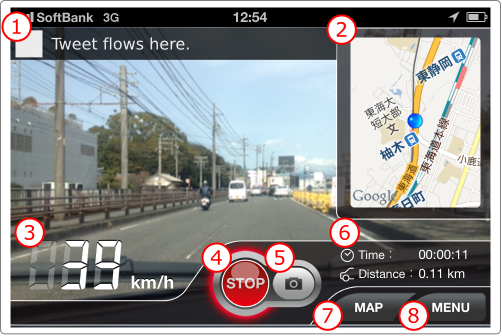
Multifunctional drive recorder app for iPhone, MultiDriveRecorder. The MultiDriveRecorder is a drive recorder app that shows various informations.A normal drive recorder only shows video display on the screen and it is boring.In additionally, the MultiDriveRecorder shows speed meter, twitter time line and map on the screen, so you can enjoy driving.
MultiDriveRecorder gained the 5th place in Japanese AppStore navigation category paid ranking.
Emergency Mode is the function to cover a case which recording is not started by shock.
If Emergency Mode is ON, you can start recording by touching the display. This recording is same as the auto-recording that starts by shock. ( It records two minutes before and after touching the display. )
1. Turn "ON" the setting item "Emergency Mode".
2. If you touch the display, recording is started.
If you don't touch the display for a while, the display becomes OFF.
Time until the display becomes OFF can be set up in 1 minute to 15 minutes. It can be back by touching the display.
This function lessens consumption of the battery.
※Recording continues while screen is OFF.
1. Turn "ON" the setting item "Auto screen OFF".
You can set up time until the display becomes OFF.
2. In recording, If you don't touch the display for a while, the display becomes OFF.
The MultiDriveRecorder senses shock by using acceleration sensor on iPhone, and record the video from 1minute before from the time detected a shock to 1minute later (2minutes altogether).
We'll explain settings of this function, and how to record the video.
+ Settings
1. Tap "Setting" on the main menu screen, then the settings screen is displayed.